
25 min read, Understand how software supply chain attacks work, why dependencies create hidden security risks, and how developers can protect applications using dependency scanning, version pinning, SBOMs, package integrity verification, and secure CI/CD practices.
From the journal
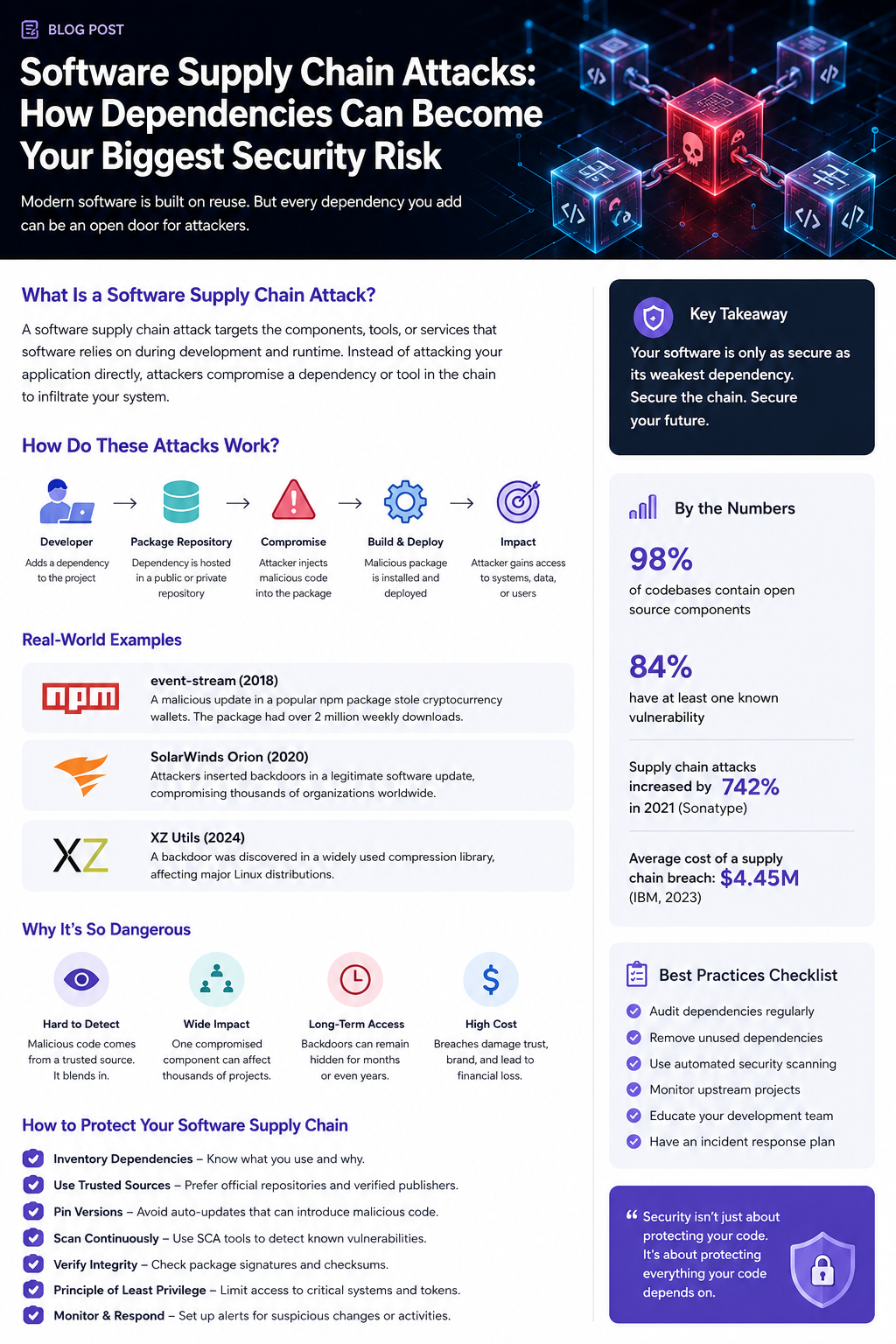
Modern software is rarely built entirely from scratch.
A typical application may depend on hundreds—or even thousands—of open-source packages, third-party libraries, container images, build tools, APIs, plugins, and cloud services. These dependencies dramatically accelerate development, but they also introduce a major security challenge:
You may trust code that you never wrote, maintained, or even inspected.
That is the foundation of a software supply chain attack.
Instead of attacking an application directly, attackers target something the application trusts—a dependency, package repository, build system, developer account, or software vendor. Once compromised, that trusted component can become the delivery mechanism for malicious code.
What Is a Software Supply Chain Attack?
A software supply chain attack occurs when an attacker compromises one of the components involved in creating, distributing, or running software.
The target doesn't necessarily have to be your application.
It could be:
An open-source npm, NuGet, PyPI, or Maven package
A GitHub repository
A CI/CD pipeline
A container image
A software vendor
A developer account
A package maintainer
A build server
A third-party API or service
A compromised update mechanism
The dangerous part is the trust relationship.
If your application automatically downloads and executes code from a trusted dependency, an attacker who compromises that dependency may effectively gain a path into your environment.
The basic attack chain
Developer → Dependency → Compromise → Build/Deploy → Application → Victim
For example:
A developer adds a popular package to a project.
The package is downloaded from a trusted repository.
An attacker compromises the package maintainer's account.
A malicious version is published.
The application automatically pulls the new version.
CI/CD builds and deploys it.
The malicious code executes in the production environment.
The developer may never notice anything unusual.
Why Dependencies Are Such a Big Risk
Modern development depends heavily on reuse.
Instead of implementing encryption, authentication, HTTP clients, logging, serialization, database access, image processing, or UI components from scratch, developers install existing libraries.
This is good engineering.
But every dependency expands your software attack surface.
Consider a simple application:
Your Application
│
├── Authentication Library
│   ├── Crypto Library
│   └── HTTP Library
│
├── Database Driver
│   └── Serialization Library
│
├── UI Framework
│   ├── Utility Package
│   └── Build Plugin
│
└── Logging Library
    └── Formatting Package
You may consciously trust your application.
But how many of those dependencies do you actually inspect?
And how many of their dependencies do you inspect?
This creates a dependency graph that can become surprisingly large.
The Transitive Dependency Problem
One of the most overlooked risks is the transitive dependency.
You might install:
npm install package-a
But package-a may depend on:
package-a
 ├── package-b
 │    ├── package-c
 │    └── package-d
 └── package-e
      └── package-f
You didn't explicitly choose packages C, D, E, or F.
Yet your application may still execute their code.
This means security isn't simply about asking:
"Are my dependencies safe?"
You also need to ask:
"Are my dependencies' dependencies safe?"
How Attackers Exploit the Supply Chain
There are several common attack techniques.
1. Malicious Packages
Attackers can publish packages designed to look legitimate.
They may use:
Typosquatting
Similar package names
Fake documentation
Stolen project branding
SEO manipulation
Social engineering
For example, suppose a legitimate package is:
awesome-auth
An attacker might publish:
awesome-authentication
or:
awesome-auth1
A developer could accidentally install the malicious package.
2. Compromised Maintainer Accounts
An attacker doesn't always need to compromise the package itself.
They can compromise the person who maintains it.
Once they gain access to the maintainer's:
npm account
GitHub account
PyPI account
CI/CD credentials
signing keys
they may be able to publish a legitimate-looking malicious update.
This is particularly dangerous because the package already has an established reputation.
3. Dependency Confusion
Dependency confusion occurs when an attacker publishes a malicious package with the same name as an internal/private package.
For example, an organization might internally use:
company-auth
An attacker could publish a public package using the same name.
If the build system incorrectly prioritizes the public registry, the malicious package may be downloaded instead.
The attacker has essentially turned the package manager itself into the attack vector.
4. Compromised Build Pipelines
Even if your dependencies are secure, your build environment can become the target.
Attackers may compromise:
GitHub Actions
Jenkins
GitLab CI
Azure DevOps
Build servers
Deployment credentials
CI/CD secrets
A compromised pipeline can potentially modify artifacts before they reach production.
This is particularly dangerous because build systems often have access to:
Source Code
      ↓
Build System
      ↓
Secrets
      ↓
Cloud Credentials
      ↓
Production
One compromised component can therefore provide access to an entire environment.
Real-World Examples
Supply chain attacks are not theoretical.
SolarWinds — 2020
Attackers compromised the software build process of SolarWinds and inserted malicious code into legitimate software updates.
Customers downloaded what appeared to be normal, trusted updates.
The compromised updates then provided attackers with a path into affected organizations.
The incident demonstrated a fundamental supply chain problem:
A trusted software update can become a trusted delivery mechanism for an attacker.
event-stream — 2018
The popular npm package event-stream was compromised after a malicious contributor gained control of the project.
A malicious dependency was introduced that ultimately targeted cryptocurrency wallets.
The incident demonstrated how attackers can exploit the trust placed in widely used open-source projects.
XZ Utils — 2024
The XZ Utils incident demonstrated another sophisticated supply chain threat.
Malicious code was introduced into versions of the widely used XZ compression utilities and associated libraries.
The vulnerability attracted enormous attention because the affected software is part of the Linux ecosystem and could have had extremely serious consequences if the attack had reached its intended impact.
The lesson was clear:
Even highly mature and widely trusted open-source infrastructure can become part of a sophisticated supply chain attack.
Why Supply Chain Attacks Are So Dangerous
1. They Look Legitimate
Malicious code may arrive through a package you've intentionally installed.
There may be no suspicious download.
No strange executable.
No obvious phishing email.
Just:
npm update
or:
dotnet restore
or:
pip install
The malicious code can enter through a normal development workflow.
2. One Compromise Can Affect Thousands of Users
Attackers don't necessarily need to compromise 10,000 applications individually.
They can compromise one popular dependency and potentially reach thousands of projects.
This creates a powerful amplification effect:
             Compromised Package
                    │
       ┌────────────┼────────────┐
       ↓            ↓            ↓
   Company A    Company B    Company C
       │            │            │
       ↓            ↓            ↓
   Production   Production   Production
The dependency becomes the attacker's distribution network.
3. Detection Can Be Difficult
Malicious code hidden inside a legitimate package may blend into normal application behavior.
It might:
Steal environment variables
Exfiltrate API keys
Read configuration files
Modify application behavior
Install additional malware
Establish persistence
Contact an attacker-controlled server
And because the code originated from a trusted dependency, security teams may initially overlook it.
How to Protect Your Software Supply Chain
You don't need to stop using open-source software.
Instead, you need to manage dependency risk deliberately.
1. Know What You Depend On
Maintain an inventory of your dependencies.
Track:
Direct dependencies
Transitive dependencies
Versions
Maintainers
Licenses
Known vulnerabilities
Sources
Release history
If you don't know what's inside your application, you can't effectively secure it.
2. Pin Important Versions
Avoid blindly accepting arbitrary versions.
Instead of:
latest
use controlled versions and lockfiles.
Examples include:
package-lock.json
packages.lock.json
yarn.lock
pnpm-lock.yaml
poetry.lock
Version pinning makes builds more predictable and reduces unexpected dependency changes.
However, pinning alone isn't enough.
You also need a process for safely updating dependencies.
3. Use Automated Dependency Scanning
Security tooling can continuously check dependencies for known vulnerabilities.
Useful approaches include:
Software Composition Analysis (SCA)
Dependency vulnerability scanners
Secret scanning
Static analysis
Container scanning
Software Bill of Materials (SBOM)
The goal is to detect problems before vulnerable code reaches production.
4. Verify Package Integrity
Where supported, use:
Package signatures
Checksums
Trusted registries
Signed commits
Provenance information
Reproducible builds
The more you can verify where a package came from and how it was built, the harder it becomes for attackers to silently replace it.
5. Minimize Dependencies
Every dependency introduces some level of risk.
Before adding a package, ask:
Do we really need this?
A package that saves you ten lines of code may not justify introducing another long-term dependency.
The goal isn't zero dependencies.
The goal is:
intentional dependencies.
6. Remove Unused Packages
Old dependencies are often forgotten.
They can remain in projects long after they're needed.
Regularly remove:
Unused libraries
Deprecated packages
Abandoned packages
Duplicate dependencies
Unnecessary build tools
Reducing dependency count reduces your attack surface.
7. Secure CI/CD
Your build pipeline deserves the same security attention as production.
Protect:
CI/CD credentials
Deployment tokens
Package publishing credentials
Cloud access keys
Signing certificates
Environment secrets
Use short-lived credentials where possible and follow the principle of least privilege.
A build server should not automatically have unrestricted access to everything.
The Role of SBOMs
A Software Bill of Materials (SBOM) is essentially an inventory of the components contained in a software product.
Think of it like an ingredient list.
Instead of:
"This application contains our code."
you can determine:
Application
├── ASP.NET Core
├── Newtonsoft.Json
├── Entity Framework
├── Package A
├── Package B
└── Package C
When a vulnerability is discovered in a component, an SBOM can help organizations quickly answer:
"Are we affected?"
Without an accurate dependency inventory, answering that question can take considerably longer.
Security Is a Continuous Process
Supply chain security isn't something you do once before deployment.
Dependencies change.
Maintainers change.
Vulnerabilities are discovered.
Packages become abandoned.
Attackers change their techniques.
A secure development process therefore needs continuous monitoring.
A practical workflow looks like:
Discover
   ↓
Evaluate
   ↓
Approve
   ↓
Pin
   ↓
Scan
   ↓
Build
   ↓
Verify
   ↓
Deploy
   ↓
Monitor
   ↓
Repeat
Security becomes part of the development lifecycle rather than a final checkpoint.
A Practical Developer Checklist
Before adding a new dependency, ask:
Who maintains it?
Is it actively maintained?
How popular is it?
Does it have a trustworthy release history?
Does it introduce many transitive dependencies?
Are vulnerabilities being addressed quickly?
Is the package source trustworthy?
Can its integrity be verified?
Do we actually need it?
For existing projects:
Keep dependency inventories up to date.
Commit lockfiles.
Scan dependencies automatically.
Remove unused packages.
Monitor security advisories.
Protect package publishing credentials.
Secure CI/CD pipelines.
Use least-privilege permissions.
Consider SBOM generation.
Have an incident response process for compromised dependencies.
Final Thoughts
The biggest misconception about application security is that your code is the entire attack surface.
It isn't.
Your application sits inside a much larger ecosystem of libraries, packages, build systems, repositories, containers, services, developers, and infrastructure.
Every connection represents a potential trust relationship.
And attackers understand that.
They don't always need to break through your front door.
Sometimes, they simply compromise something you already invited inside.
Your application is only as trustworthy as the software supply chain behind it.
The goal isn't to stop using open source or third-party dependencies. Modern software development depends on them.
The goal is to understand what you're trusting, verify it, monitor it, and limit the damage when something eventually goes wrong.
Secure your dependencies. Secure your pipeline. Secure your supply chain.
Have a related challenge in mind?
Start a conversation