
20 min read, Understand the most common cloud misconfigurations across IAM, storage, secrets, networking, and exposed services—and learn practical strategies for least-privilege access, secure secret management, network segmentation, continuous monitoring, and automated configuration security.
From the journal
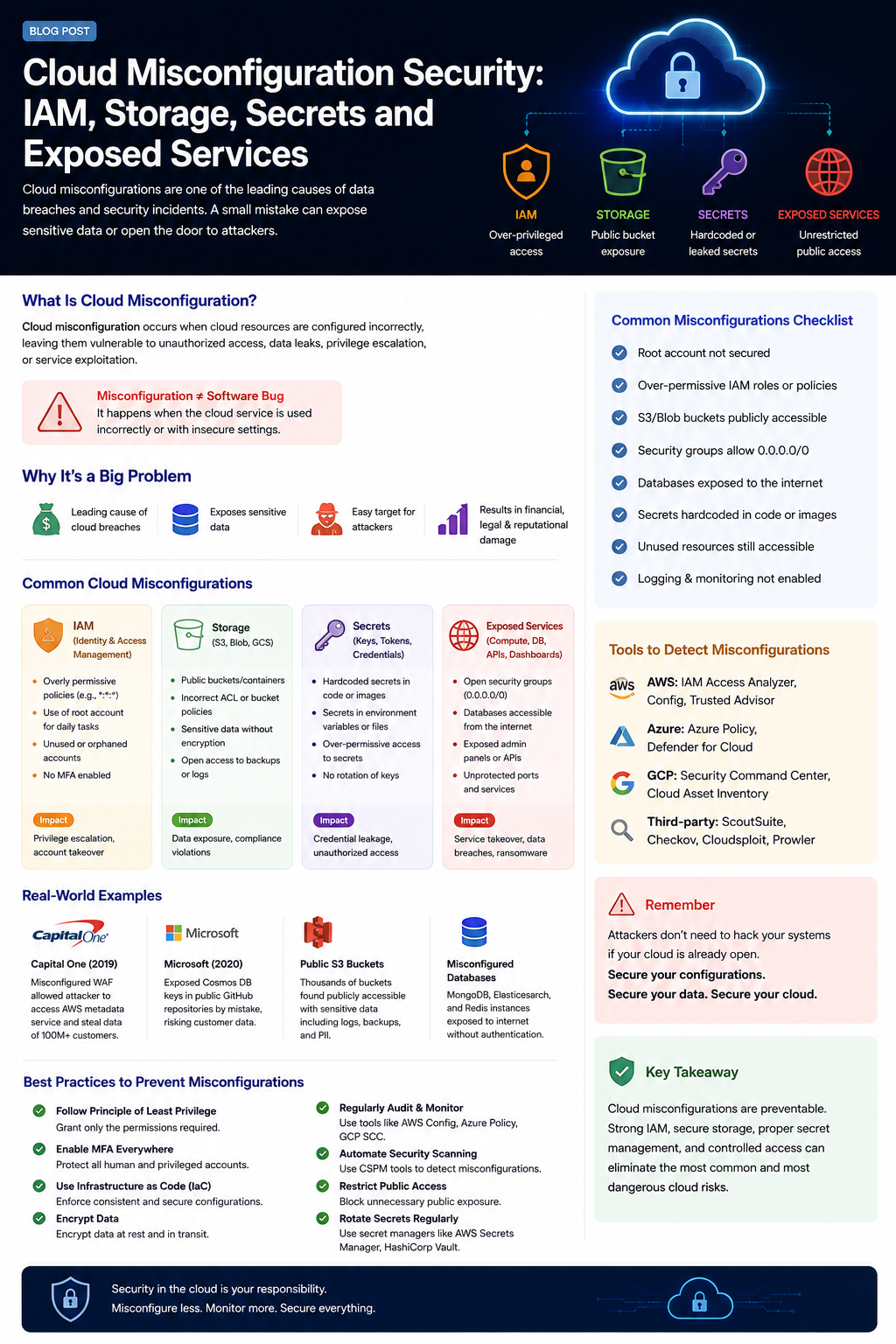
Cloud platforms make it incredibly easy to deploy applications, databases, storage, APIs, and infrastructure at scale.
But that flexibility comes with a major security challenge:
A cloud environment is only as secure as its configuration.
You can have perfectly written application code, strong encryption, and a secure development process—and still expose sensitive data because a storage bucket is public, an IAM role has excessive permissions, a secret is committed to Git, or a database is reachable from the internet.
These problems are known as cloud misconfigurations.
Unlike traditional vulnerabilities that may require exploiting a software bug, many cloud incidents happen because a legitimate cloud service was configured in an unsafe way.
What Is Cloud Misconfiguration?
A cloud misconfiguration occurs when a cloud resource is configured in a way that creates unnecessary security risk.
Examples include:
Publicly accessible storage
Overly permissive IAM policies
Exposed databases
Unrestricted security groups
Hardcoded API keys
Missing encryption
Disabled logging
Weak authentication
Public management interfaces
Unused accounts with active credentials
The dangerous part is that the cloud provider may be working exactly as configured.
The problem is the configuration itself.
Think of it this way:
Cloud Service
      +
Incorrect Configuration
      ↓
Unintended Exposure
      ↓
Attacker Access
      ↓
Data / Account / Infrastructure Compromise
Why Cloud Misconfiguration Is So Dangerous
Cloud environments contain extremely valuable resources.
A single account can potentially contain:
                    Cloud Account
                         │
       ┌─────────────────┼─────────────────┐
       ↓                 ↓                 ↓
    Storage             IAM              Databases
       │                 │                 │
       ↓                 ↓                 ↓
   Customer Data     Credentials       Application Data
                         │
                         ↓
                    Cloud Services
If an attacker gains excessive access to one component, they may be able to move toward other resources.
This is why cloud security isn't simply about protecting individual servers.
It's about controlling identity, permissions, network access, data exposure, and configuration across the entire environment.
1. IAM Misconfiguration
Identity and Access Management (IAM) is one of the most important parts of cloud security.
IAM determines:
Who can access resources
What actions they can perform
Which resources they can access
Under which conditions access is allowed
A common mistake is granting far more permissions than necessary.
For example, an application that only needs to read objects from one storage location shouldn't require broad permissions across the entire cloud account.
The Principle of Least Privilege
The principle is simple:
Give identities only the permissions they actually need.
Instead of:
Application
   ↓
AdministratorAccess
   ↓
Everything
prefer:
Application
   ↓
ApplicationRole
   ↓
Read objects
   ↓
Specific bucket
This limits the blast radius if the application's credentials are compromised.
Common IAM Misconfigurations
Overly Permissive Policies
Policies containing broad permissions such as:
Action: *
Resource: *
can create enormous risk.
Not every wildcard is automatically dangerous, but unrestricted permissions should always have a strong justification.
Shared Accounts
Multiple developers or services sharing the same credentials makes it difficult to determine:
Who performed an action
Which service was compromised
Which credentials need to be revoked
Use individual identities and workload-specific roles wherever possible.
Missing MFA
Privileged accounts should have strong authentication controls.
MFA can provide an additional layer of protection if passwords or credentials are compromised.
Unused Credentials
Old users, access keys, service accounts, and roles can remain active long after they are needed.
Attackers love forgotten credentials because they may remain unnoticed.
Regularly review and remove unused access.
2. Storage Misconfiguration
Cloud storage is another common source of data exposure.
Services such as object storage are designed to make data highly accessible.
That flexibility can become dangerous when access controls are configured incorrectly.
A storage resource intended to be:
Private
can accidentally become:
Public
And the result can be catastrophic.
Public Storage Exposure
Imagine a company storing:
/customer-data/
    users.csv
    invoices.pdf
    backups.zip
    database.sql
If the storage location is accidentally exposed publicly, an attacker may not need to exploit any software vulnerability.
They simply access the data.
This is one of the defining characteristics of cloud misconfiguration:
The attack may require no sophisticated exploit at all.
Storage Security Checklist
For cloud storage:
Disable unnecessary public access
Use explicit access policies
Encrypt sensitive data
Restrict access by identity
Monitor access logs
Protect backups
Review bucket/container permissions
Avoid storing secrets unnecessarily
Enable versioning where appropriate
Apply lifecycle policies to sensitive data
And most importantly:
Don't assume "private" is permanent.
Configuration changes, infrastructure deployments, and policy updates can accidentally alter access.
3. Secrets and Credential Exposure
Secrets are another major cloud security problem.
Examples include:
API keys
Database passwords
Access tokens
Private keys
OAuth credentials
Service account credentials
Cloud access keys
One of the worst places to store them is directly inside source code.
For example:
config.production.json

API_KEY = "..."
DATABASE_PASSWORD = "..."
CLOUD_ACCESS_KEY = "..."
Once committed to a repository, the secret may exist in:
Git history
Forks
CI/CD systems
Developer machines
Backups
Logs
Deleting the line later doesn't necessarily remove the secret from history.
Use a Secret Manager
Instead of embedding credentials in source code, use a dedicated secret-management system.
Examples include:
AWS Secrets Manager
Azure Key Vault
Google Cloud Secret Manager
HashiCorp Vault
The application retrieves secrets at runtime using an identity that has only the permissions it requires.
Conceptually:
Application
     │
     │ authenticated request
     ▼
Secret Manager
     │
     ▼
Secret
This is safer than placing credentials directly in application source code.
Rotate Secrets
Even properly managed secrets should have a lifecycle.
Ask:
When was this credential created?
Who can access it?
Is it still required?
When was it last used?
Can it be rotated automatically?
What happens if it is compromised?
Secret rotation reduces the useful lifetime of stolen credentials.
4. Exposed Services
Cloud environments make it easy to expose services to the internet.
Sometimes that's intentional.
A public website needs to be accessible.
But a database usually doesn't need to be.
A common mistake looks like:
Internet
   │
   ├── Web Server     ✓
   ├── API            ✓
   ├── Database       ✗
   ├── Redis          ✗
   └── Admin Panel    ✗
The problem isn't that these services exist.
The problem is that they're reachable from places that don't need access.
Exposed Databases
Databases should generally not be directly accessible from the public internet unless there is a specific architectural requirement and strong controls around it.
Potentially exposed services include:
PostgreSQL
MySQL
MongoDB
Redis
Elasticsearch
SQL Server
A database with weak authentication and public network exposure can become an extremely attractive target.
Security Groups and Firewall Rules
Cloud firewalls and security groups determine who can communicate with your services.
A rule such as:
0.0.0.0/0 → Port 5432
means the service may be reachable from anywhere on the IPv4 internet, depending on the surrounding configuration.
That doesn't automatically mean the database is compromised.
But it dramatically increases the attack surface.
Prefer rules based on actual communication requirements:
Application Server
       │
       ▼
Database
rather than:
Entire Internet
       │
       ▼
Database
Exposed Management Interfaces
Administrative interfaces are particularly sensitive.
Examples include:
Monitoring dashboards
Database administration panels
Kubernetes dashboards
Internal APIs
CI/CD interfaces
Management consoles
These services should be protected using appropriate combinations of:
Private networking
Strong authentication
MFA
VPN or zero-trust access
IP restrictions
Network segmentation
Short-lived credentials
5. Misconfigured Encryption
Encryption is another area where configuration matters.
Cloud platforms often provide encryption by default or make it easy to enable.
But organizations still need to understand:
What data is encrypted?
Where is it encrypted?
Who controls the encryption keys?
Who can decrypt the data?
Are backups encrypted?
Are logs encrypted?
Is data encrypted in transit?
Encryption doesn't compensate for overly broad access permissions.
If an attacker has legitimate access to the decryption capability, encrypted data may still be exposed.
6. Logging and Monitoring Misconfiguration
Security controls are less useful if nobody knows when something goes wrong.
Cloud environments should have visibility into important events such as:
Authentication activity
Privilege changes
IAM policy modifications
Storage access
Security group changes
New credentials
Unusual API calls
Public exposure changes
Logging should be protected against unauthorized modification.
Otherwise, an attacker who compromises an environment may also attempt to hide their activity.
Real-World Lessons
Cloud misconfiguration has repeatedly contributed to major security incidents.
The specific details vary, but many incidents follow a familiar pattern:
Misconfiguration
      ↓
Unexpected Exposure
      ↓
Unauthorized Access
      ↓
Data Discovery
      ↓
Data Exfiltration
      ↓
Business Impact
The attacker doesn't necessarily need an advanced zero-day.
Sometimes they simply find what the organization accidentally left exposed.
Cloud Security Is a Shared Responsibility
Cloud providers secure the underlying infrastructure.
Customers are still responsible for many aspects of how their cloud resources are configured and used.
The exact division depends on the service model.
For example:
Cloud Provider
    ↓
Physical Infrastructure
    ↓
Managed Cloud Services
while the customer may remain responsible for:
Identity
Permissions
Data
Network Rules
Secrets
Application Configuration
Access Policies
Using a cloud provider doesn't automatically make an application secure.
Cloud security still requires secure configuration.
Infrastructure as Code Can Help
Manual cloud configuration makes it easy to create inconsistencies.
Infrastructure as Code (IaC) allows teams to define infrastructure using version-controlled configuration.
Examples include:
Terraform
AWS CloudFormation
Azure Bicep
Pulumi
Instead of manually configuring resources:
Developer
   ↓
Cloud Console
   ↓
Random Configuration
you can move toward:
Code
  ↓
Review
  ↓
Security Scan
  ↓
CI/CD
  ↓
Controlled Deployment
This makes infrastructure changes easier to review, reproduce, and audit.
But IaC can also automate insecure configurations.
Automation doesn't make a configuration secure—it makes the configuration repeatable.
Security checks therefore need to be part of the IaC workflow.
Continuous Cloud Security
Cloud security should not be a one-time audit.
Cloud environments change constantly.
Developers create resources.
Teams modify policies.
New services are deployed.
Temporary access becomes permanent.
Firewall rules change.
Storage permissions evolve.
Therefore, security monitoring needs to be continuous.
A practical process looks like:
Discover
   ↓
Assess
   ↓
Remediate
   ↓
Monitor
   ↓
Detect Drift
   ↓
Reassess
Tools for Detecting Misconfigurations
Cloud providers and security platforms offer tools for identifying configuration problems.
Depending on your environment, these can include:
AWS Config
AWS IAM Access Analyzer
AWS Security Hub
Azure Policy
Microsoft Defender for Cloud
Google Cloud Security Command Center
Cloud Asset Inventory
CSPM platforms
IaC security scanners
The goal isn't to collect as many security tools as possible.
The goal is to continuously answer:
"What is exposed right now, and should it be?"
A Practical Cloud Misconfiguration Checklist
IAM
Use least-privilege permissions
Enable MFA for privileged identities
Remove unused users and credentials
Avoid long-lived access keys where possible
Review IAM policies regularly
Use workload identities or roles instead of shared credentials
Storage
Block unnecessary public access
Review bucket/container policies
Encrypt sensitive data
Protect backups
Monitor storage access
Review permissions after infrastructure changes
Secrets
Never commit secrets to source control
Use a dedicated secret manager
Rotate credentials
Scan repositories for leaked secrets
Limit access to secrets
Avoid putting secrets into logs
Exposed Services
Minimize internet-facing services
Keep databases private where possible
Restrict security groups and firewall rules
Protect administrative interfaces
Use private networking for internal services
Monitor unexpected public exposure
Monitoring
Enable cloud audit logging
Monitor IAM changes
Monitor network changes
Alert on public storage exposure
Detect configuration drift
Review security findings continuously
The Most Important Principle
A secure cloud environment isn't one where nothing can be accessed.
It's one where everything can only be accessed by the identities and systems that actually need it.
Think about every resource:
Who can access it?
       ↓
What can they do?
       ↓
From where?
       ↓
For how long?
       ↓
Is the access monitored?
If you can't answer those questions, the resource deserves a security review.
Final Thoughts
Cloud misconfiguration is dangerous precisely because it often doesn't look like an attack.
There may be:
No exploit
No malware
No sophisticated payload
No zero-day
Sometimes the attacker simply discovers that something was configured incorrectly.
A public storage bucket.
An overly permissive IAM role.
An exposed database.
A forgotten access key.
An unrestricted security group.
A leaked secret.
These small configuration mistakes can become major security incidents when they expose valuable cloud resources.
The solution isn't complicated in principle:
Use least privilege. Restrict public access. Protect secrets. Segment networks. Encrypt sensitive data. Monitor configuration changes. Automate security checks.
Most importantly, treat cloud configuration as part of your application's security architecture—not as an operational detail.
Your cloud provider secures the platform. You still have to secure what you build on it.
Have a related challenge in mind?
Start a conversation